Documentation
How the Cockpit Works
What is a Cockpit? #
The intelligence layer for every call you make. Research before the call, answers during it, documentation after it, all rendered as scannable cards. It puts time back in your day by compressing the research, the prep, and the admin, and it gets you out of living in the CRM. Not a sequencer, not a CRM, not an outreach tool. A cockpit: the seat you sell from.
built on
The foundation. Every surface pulls from it.
| 01 Pre-Call | 02 On-Call | 03 Post-Call | General AI | |
|---|---|---|---|---|
| What it does | Full prospect workup | Instant answers mid-call | Transcript to CRM-ready cards | Chat, drafting, strategy |
| When | Before the call | During the call | After the call | Whenever |
| Runs on | Your KB + live web | Your KB | Your KB | Your KB + frontier model |
Who is it for? #
B2B reps who run complex sales cycles.
- Full-cycle AEs. The prep of a rep who spent 45 minutes on research, at the volume of a rep who skipped it.
- Technical sellers. Your whole knowledge base one query away mid-call. You stop saying “let me get back to you.”
- SDRs and BDRs. A full brief and a personalized opener in the time it takes the call to connect, without dropping your dial count.
- Founders who sell. You are the sales team. Cockpit is the enablement department you have not hired yet.
If what you sell is more than a transaction, this is the tab that is open when your sales hat is on. You may not need it all day. When you are selling, you do.
Where does it hit hardest? #
Knowledge-heavy verticals. Specialty hardware and software, deep tech, semiconductors, aerospace, medical devices, biotech, climatech, physical security, cybersecurity, fintech infrastructure, AI infrastructure, industrial tech, legal tech. Anywhere the product has depth and the buyer asks hard questions.
Not for you if
You sell transactional, low-ACV deals. You do not take calls. Your product has no knowledge depth worth encoding. Cockpit earns its seat on complex sales; if a one-line pitch closes your deals, you do not need this.
Why not just use ChatGPT or Claude? #
You can prompt your way to 80% of this. The missing 20% is everything that makes it hold up in a live sales motion:
- A maintained KB. Always loaded, always current. No re-pasting docs, no re-explaining your methodology every session.
- Nothing gets lost. No digging through old chats, no context overload. Every run lands in the Mission Log.
- Cards, not walls of text. Output built to be scanned mid-call, not read like an essay.
- Tuned to sell. General models are tuned to be helpful. Cockpit is tuned to sell, and tuned to sell your product specifically, with all the context that takes.
SYSTEM
Knowledge Base #
A bespoke knowledge base: everything that matters to your sale, engineered for retrieval and shaped by reps who have carried a quota.
What goes in it? #
Everything the sale touches, organized by how you reach for it.
- Product documentation and technical specs
- Pricing logic and tier breakdowns, including the conditional rules
- Competitive intel with positioning against specific rivals
- Objections mapped to proven responses
- Proof points, case studies, win/loss patterns
- Industry context and vertical-specific language
- Buyer personas
Every entry is tagged to the context where it earns its keep: the objection it answers, the competitor it counters, the vertical it speaks to. Retrieval works by situation, not by keyword.
Why does structure matter? #
A pile of docs answers searches. A structured KB answers situations. Objection responses are tagged to specific competitors and scenarios. Pricing carries its conditional rules. Proof points map to verticals. The system knows a technical objection from a budget objection and pulls different context for each. That structure is the difference between a search engine and a trained SE sitting next to you.
The Playbook #
Your sales methodology, baked in. How you qualify, what discovery looks like, how objections get handled, which signals mean a deal is real. It gets encoded when we build your cockpit, and every surface runs on it: briefs highlight what your qualification criteria care about, on-call responses follow your objection framework, summaries flag what your pipeline methodology tracks. The output fits your sales process because it was built from it.
How is it built? #
With you. During onboarding we ingest your decks, product docs, battlecards, call notes, and internal wikis, then restructure them for sales-context retrieval. You review, we refine, it ships.
How is it maintained? #
Updates go in once and land everywhere. Two tracks. On demand: new pricing, a new competitor, a sharper answer to an objection. Send it over, we encode it, every surface reflects it. And on a cycle: every two weeks your KB gets a refresh pass, so stale pricing, competitor moves, and new proof points get folded in before they cost you a call. You never touch a prompt.
What does a brief cover? #
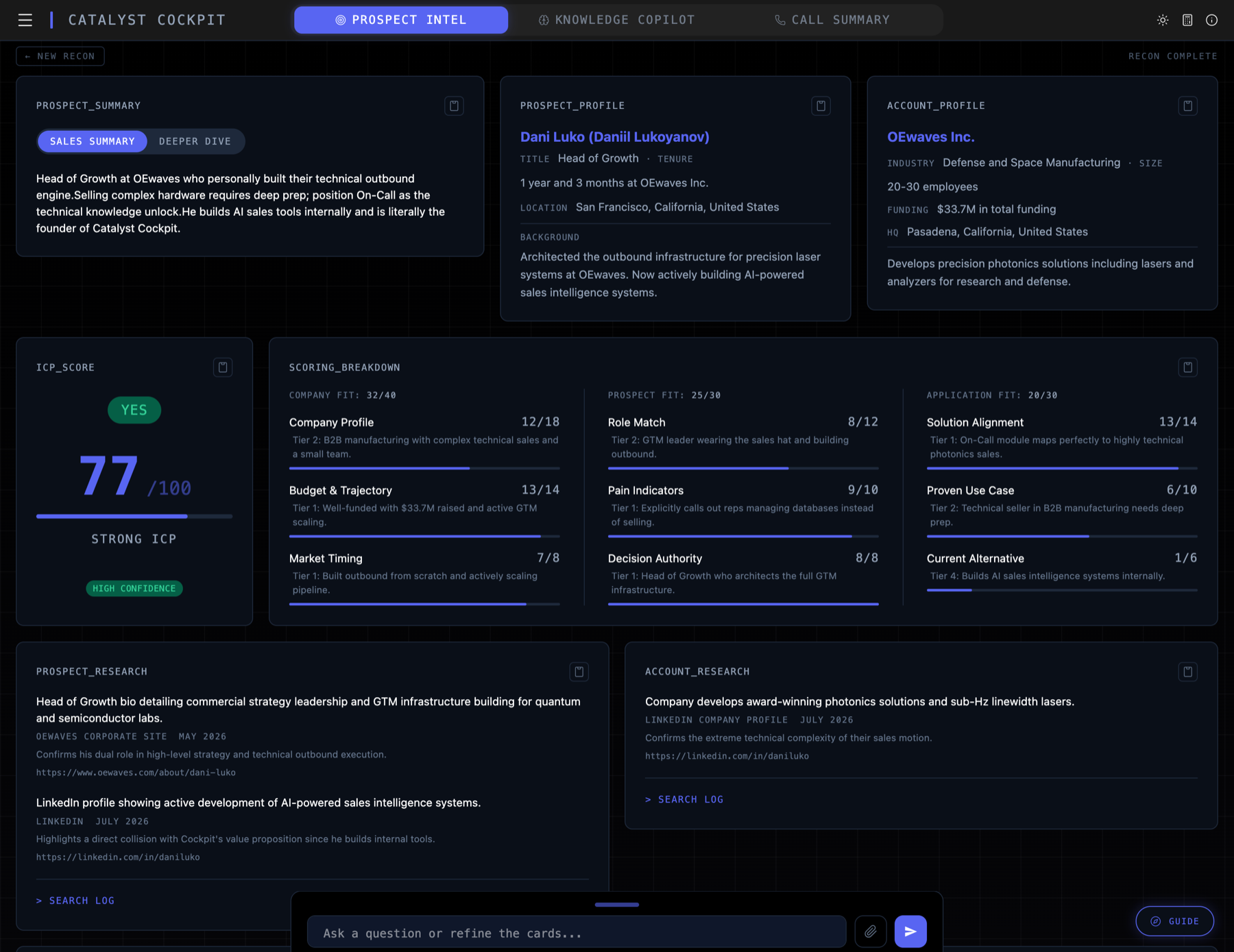
A full workup, structured into cards:
- ICP scoring. A 3x3 matrix, nine subcategories, scored out of 100. Exactly where the prospect stands and why.
- Prospect and account research. Live web research on the person and the company: recent news, funding, tech stack, hiring signals.
- Pain signal mapping. Their signals mapped to your products and verticals, so you know which pain to press.
- Red flags. Deal risks surfaced with tactical responses, before you hear them on the call.
- Talking points. Conversation starters tuned to the prospect. No cold opens.
- Outreach drafts. Cold email and LinkedIn messages tuned to the ICP score and pain signals. Ready to send without a rewrite.
How long does it take? #
40 to 90 seconds depending on how much there is to find. The output is built to be absorbed in under a minute.
What sources does it use? #
The live web plus whatever you hand it. Company sites, LinkedIn, news outlets, job postings, funding databases, technology trackers. Drop in a screenshot, a deck, a PDF, or paste your own notes and it reads those too. Every data point carries a source citation so you can verify before the call.
Refining a brief #
Steer it live. Want the outreach more technical, or a deeper read on one card? Say so and the cards regenerate in place. The brief bends to how you sell.
Try this
Run a pre-call on yourself in the Test Flight. Watch it read you the way it will read your prospects.
THE CALL / 02
On-Call Knowledge #
Your best SE's answers, one query away, while the prospect is still talking.
How does mid-call support work? #
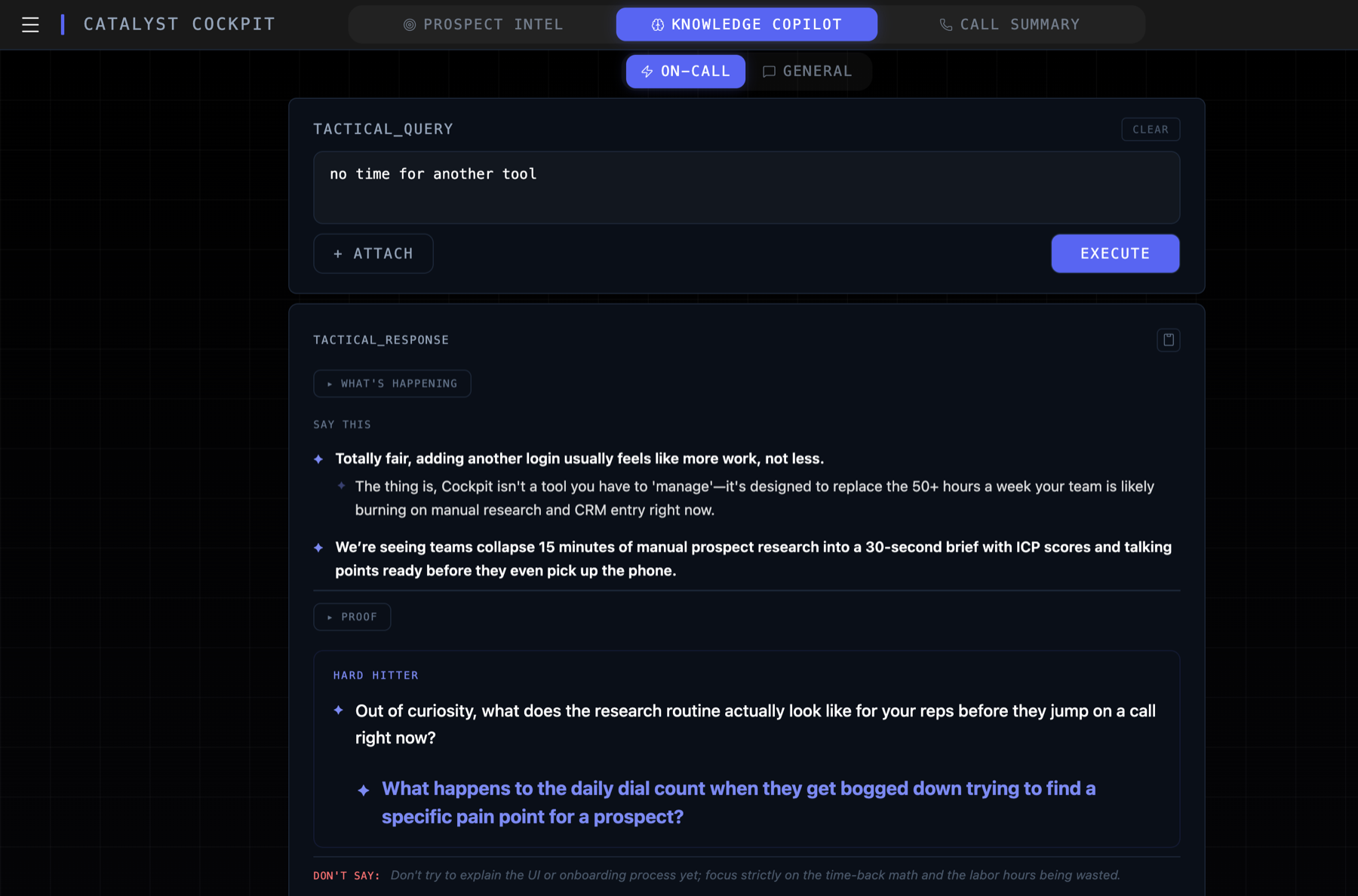
Half a sentence is enough. Mid-call you have time for a couple of words, not a paragraph of context, so it is trained to read the situation from almost nothing. Type “price pushback” or “how do we compare to [competitor] on feature X” and it frames what is really being asked, hands you the response with evidence, and arms the question that moves the conversation forward. Everything comes from your knowledge base, not a general model guessing.
What can I ask it? #
Any objection, any spec, any competitor. Objection handling is the core job: acknowledge, pivot, then a hard-hitting question that turns the pushback into the real pain underneath it. It also flags the trap answer: the reply that sounds right and loses the deal. And when a buyer asks how your feature stacks up against a competitor's latest release, the answer is already loaded. Nobody can hold every competitor's feature sheet in their head. Your cockpit can.
Can I trust it mid-call? #
You stay the filter. Answers come from the knowledge base you reviewed at the build, with the evidence shown on the card, so you can see where a claim comes from before you repeat it to a buyer. The card arms you. You still fly the plane.
Does it listen to the call? #
No. Cockpit is not a recorder and not a transcription tool. You query it when you need backup. You stay in control of the conversation.
What it does not do
It does not dial, record, or transcribe. It does not whisper answers automatically. You ask, it answers. The call is still yours.
Try this
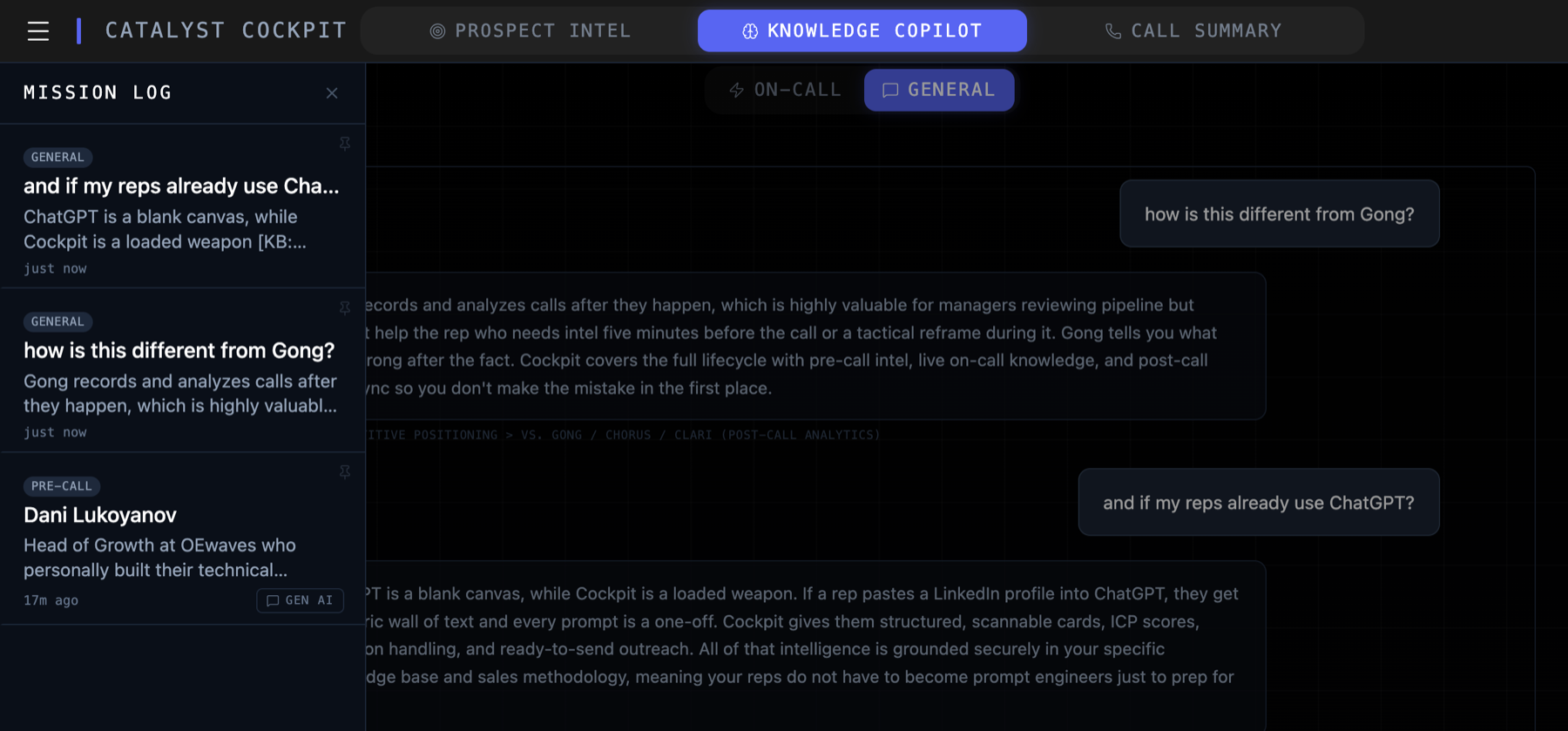
The Test Flight cockpit sells Cockpit, so object like a buyer: “we already use Gong,” “my reps can just use ChatGPT.” Watch it work the pushback.
What does it generate? #
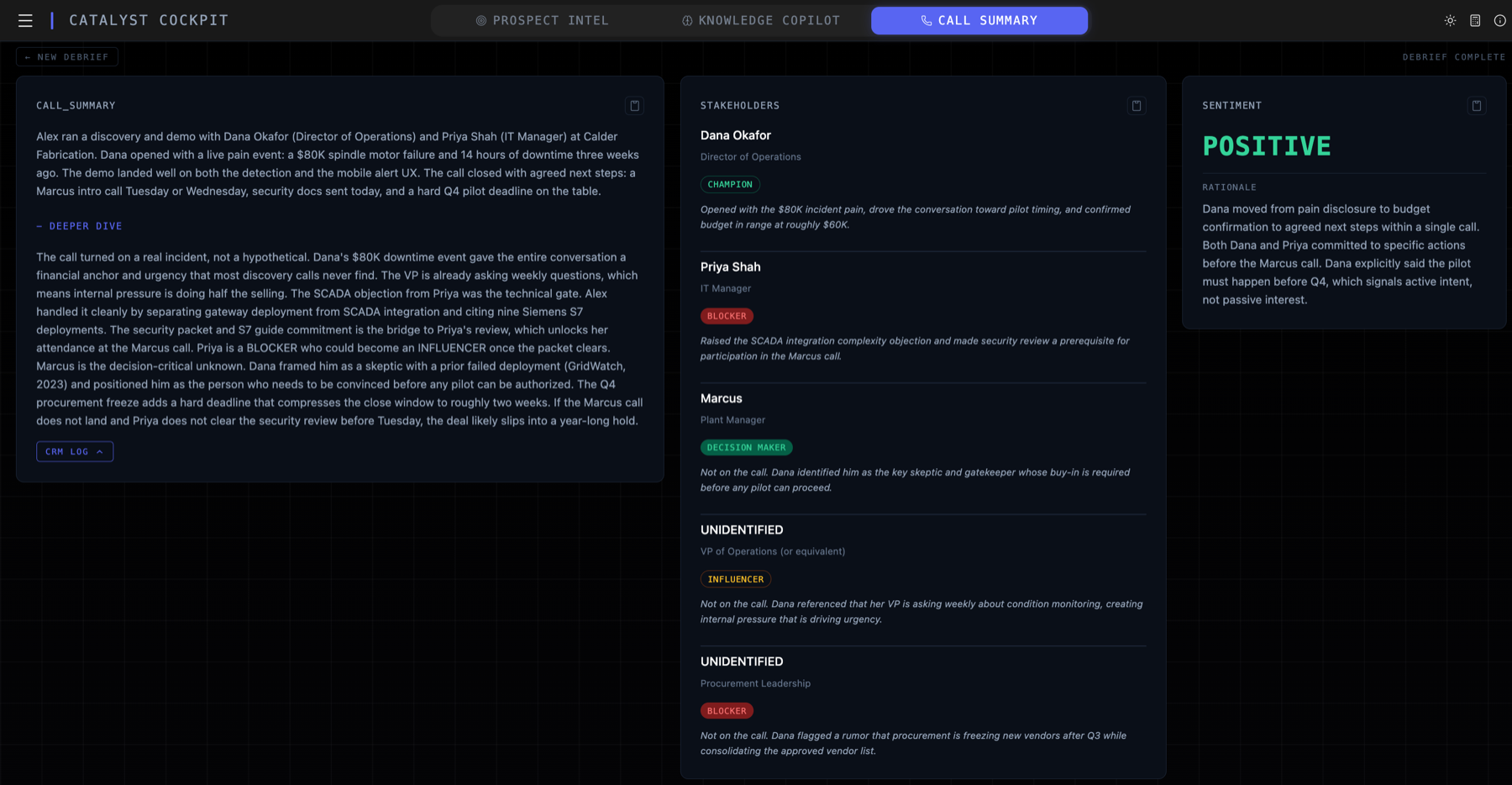
14 cards covering everything the call produced: summary, stakeholder map with buying positions, sentiment, buying signals, objections in their exact wording, red flags, key moments, timeline, budget signals, your action items, their commitments, follow-up drafts, a CRM-ready block, and sales coaching: what you did well, what you missed, how to be sharper next time.
How does it work with my CRM? #
Your fields, not generic fields. When we build your cockpit, the CRM block gets mapped to what your team actually tracks: next steps, stakeholders, objections, deal signals, whatever your pipeline needs. One paste into Salesforce, HubSpot, Zoho, whatever you run, and the record is clean.
No auto-sync
Cockpit does not write to your CRM on its own today. You review the block, you paste it, and your pipeline data stays yours. Direct integration can be built when a team wants it.
Try this
Feed the Test Flight's Post-Call a transcript you would not mind a demo reading. 14 cards come back in about a minute.
What is it? #
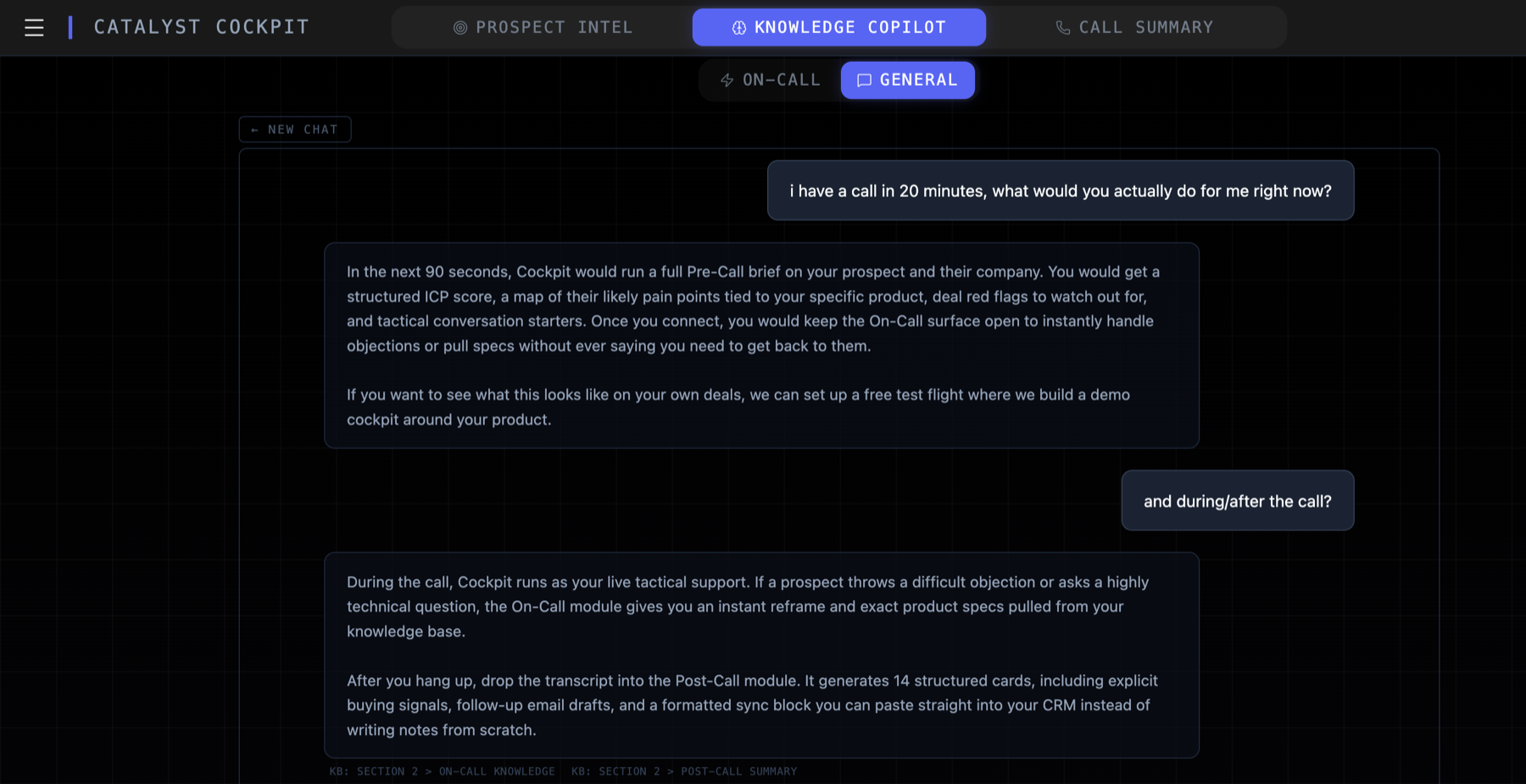
The fourth surface. Pre-Call, On-Call, and Post-Call produce structured cards. General AI is the same intelligence with the schema off: freeform chat grounded in your knowledge base.
What do reps use it for? #
- Drafting. Emails, LinkedIn posts, sequences, anything the structured modules do not cover.
- Strategy. Account planning, deal strategy, what-if analysis on a live deal.
- Product questions. Anything you would ask your best SE, answered from your KB.
Does it know about my past work? #
Yes, if you send it. Any past Pre-Call, On-Call, or Post-Call run can be pulled from the Mission Log straight into the chat as context. No copy-paste.
Try this
The Test Flight's General AI is configured to sell Cockpit itself. Ask it why you should not buy. It has heard that one before.
COCKPIT
Power-User Features #
The rest of the machine: what ships in every cockpit, and what the full build adds.
In every cockpit #
- Mission Log. Persistent history of every run across all modules. Reload any past entry or send it into General AI as context. Stored in your browser, on your device.
- File attachments. Drag, drop, or paste. PDFs, screenshots, deck slides, LinkedIn captures. Cockpit reads them as input to any module.
- Refinement chat. Every generated output takes follow-ups. Sharpen the brief, redo the outreach, push deeper on one card, with full context carried through.
In the full cockpit #
- Model switching. Multiple frontier providers wired in. Pick the model per module in Settings, switch anytime, no redeploy.
- ABM Mode. Multi-prospect account research: map a buying committee of up to five contacts in one pass, with account synthesis, a stakeholder map, cross-prospect signals, and a penetration plan. Not switched on in the public demo.
Where does my data live? #
Stored on your device, never on our servers. Cockpit is passthrough: your input goes to the AI provider for processing, the output comes back to your screen, and we store none of it. No accounts database, no conversation archive, no backend copy of your deals. Your Mission Log history lives in your browser's local storage and never leaves your machine.
Who can see my deployment? #
Only you. Every client deployment is isolated with its own API keys. Nothing is stored, cached, or shared across clients. API keys live server-side; the browser never sees them.
What about regulated industries? #
The KB gets hardened for your vertical. Medical devices and biotech get claims-safe language baked into every draft. Aerospace and specialty hardware get export-control awareness. Fintech and cybersecurity get data-handling discipline in outreach. These guardrails are flagged during the build and encoded into your KB and prompts, so the output stays inside your compliance lines without the rep having to police it.
Know the boundary
Your queries are processed by frontier AI providers to generate output. Treat Cockpit like any vendor tool: do not paste what your company would not send to a processor. If you handle regulated data, talk to us before flying.
FLY IT
Test Flight & Pricing #
Two weeks in a cockpit built on your product, flown on your real deals. Free.
What is a Test Flight? #
The evaluation is the product. The demo you can fly right now is a cockpit built to sell Cockpit. Your Test Flight is the same machine built on your product, your competitors, your market. You fly it on real prospects for two weeks. Keep it if it earns the seat. Walking away costs you nothing but the flight hours.
How does it work? #
- 01Book a call. We learn your product, your sales motion, and where you lose time.
- 02We build your cockpit. A starter knowledge base from your public materials and what we learn on the call, all four surfaces configured. Yours in a day.
- 03You fly it. Real prospects, real calls, two weeks.
- 04You decide. Keep it or walk away.
Starter KB vs full build
The Test Flight flies on the starter KB. The full build goes deeper: your internal decks, battlecards, and call notes get encoded, and the output starts sounding like your best rep instead of your website. Sharp on day one, sharper when we start working together.
What does it cost? #
The Test Flight is free. After two weeks:
- The full cockpit: a one-time $1,000 build per rep, because each cockpit gets tuned to its rep's voice. The full bespoke KB described above, tuning sessions with us until the output sounds like you on a good day, and a direct line for anything that needs customizing. Then $150 a month per rep, less on annual prepay. Multi-rep teams get build discounts, or can share one cockpit and trade away the personal tuning.
- Need more time: extend for $200 a month, and every extension dollar credits toward your build if you buy. Renting costs more than owning, on purpose.
- Walk away: you owe nothing.
Anything else? #
No contracts, no seat minimums. And if you want to check the math, the in-app ROI calculator runs your real numbers with conservative assumptions.
Your Move
You know the system. Now fly it.
A real cockpit with a loaded KB, and its product is Cockpit. Make it earn your two weeks.